
Surround and Dolby Atmos
A project can now be Stereo, 5.1, 7.1 or 7.1.4. In surround, every track, group, FX track and the master carries all of the format's channels, and your speakers play them.
Real surround projects. Pick the format and Listn Studio sets up the panners, the master and the outputs your interface needs. Projects remember their format.
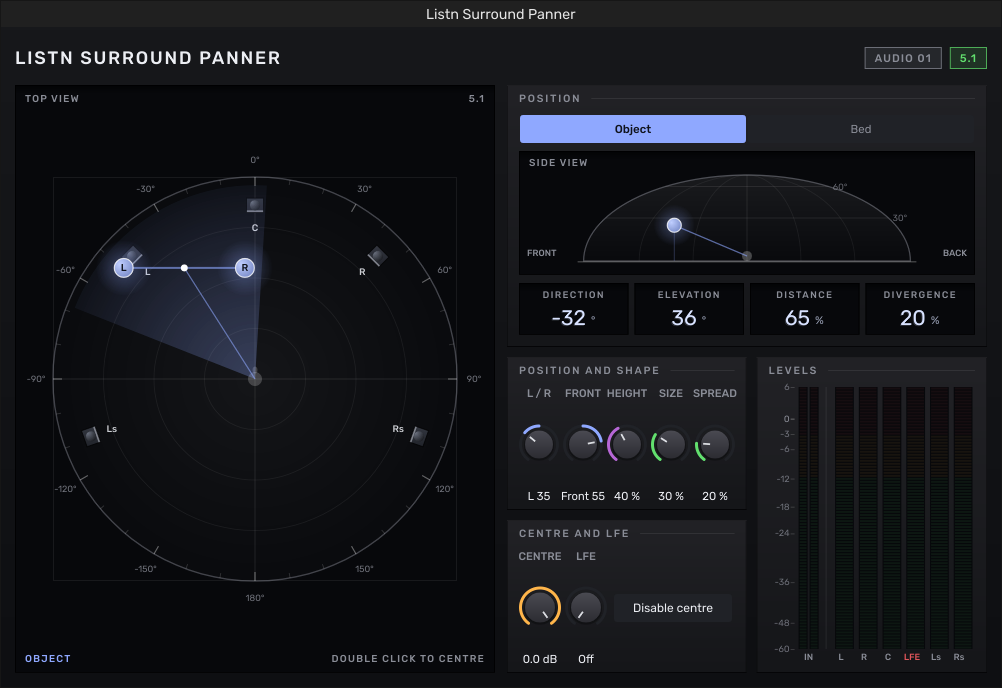
Listn Surround Panner. A new panner on every track: the room from above with its speakers, the height on a dome, and Direction, Elevation, Size, Spread, Centre and LFE. Choose Object or Bed. Disable centre sends the centre's share to left and right.
3D Renderer window. 128 inputs with the 7.1.2 bed boxed, Trim and Downmix, every speaker's level, loudness to the BS.1770 standard (momentary, short term, integrated, range and true peak), and the room in 3D.
Trim and Downmix. Play a 7.1.4 mix on 5.1 or stereo speakers, with the surrounds and heights trimmed.
Live send to the Dolby Atmos Renderer. The bed and one output per object go out through your interface to Dolby's Renderer on another computer, with SMPTE timecode (24, 25 or 30 fps) so it follows the song.
Surround exports. The master in its format with the speaker layout in the file, a stereo fold-down, a 5.1 fold-down of 7.1 and 7.1.4 mixes, and stems if you want them, each with its loudness and true peak. 16, 24 or 32 bit float at 44.1, 48 or 96 kHz.
Meters for every channel. The mixer's master meter shows every surround channel, and each track's meter shows its speakers.
All your other exports (mix, stems, bounces, video) stay stereo and use the fold-down.
New plugin: Listn Width
Listn Width makes the stereo image narrower or wider, from mono at 0% up to 200%.
Quick picks: Mono, Narrow, As is, Wide and Extra wide.
Mono below: keeps the lows in the middle under a frequency you pick, so a wide mix still plays on one speaker or a club system.
Mid and Side: turn the middle and the sides up or down on their own.
See what it does: a goniometer, a stereo image bar (the incoming width as a ghost, the outgoing width lit), a correlation meter, and mid and side levels.
The Listn mark on the Mixing Essentials
The eleven Mixing Essentials now carry a faded Listn mark in the lower right card of their windows, behind the knobs and buttons: Listn Channel Strip, Listn Reverb, Listn EQ, Compressor, Delay, Chorus, Phaser, Listn Filter, Listn Pitch Shift, Listn Mono and Listn Width.