
Mastering and Repair · Mastering console
AURIUM Master
Tone. Glue. Width. Loud.
A full mastering console on the master out.
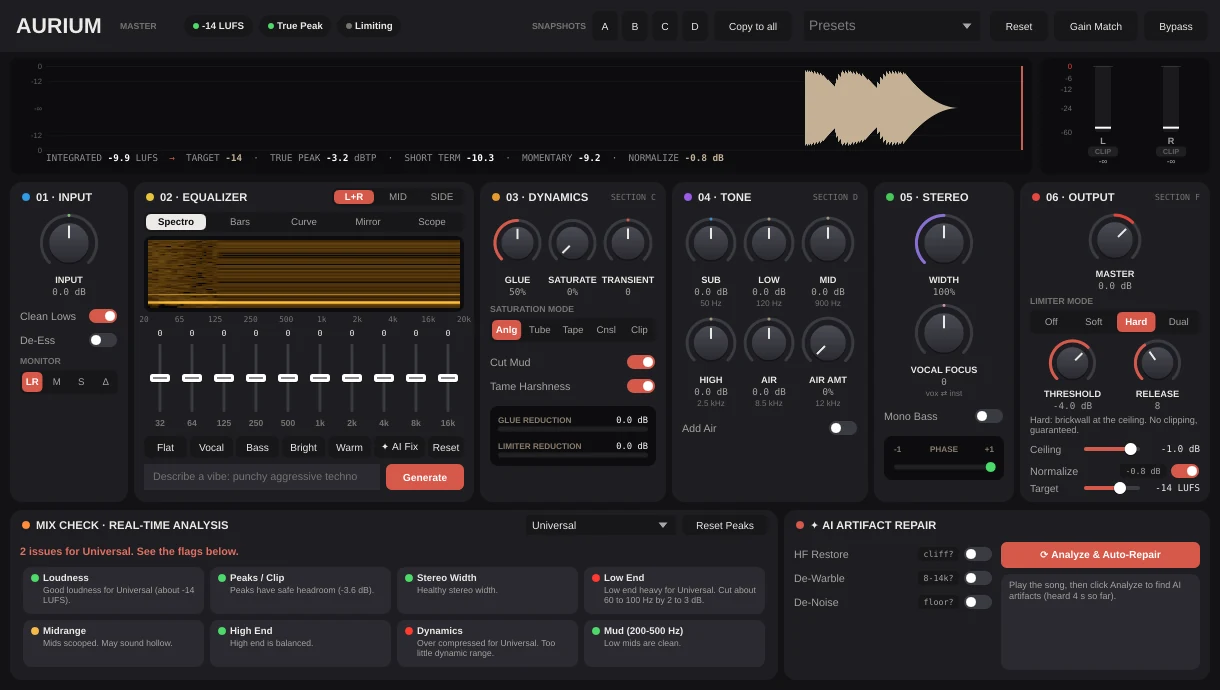
Input, a ten band EQ with a spectrogram and AI fix, dynamics with five saturation modes, tone, stereo and an output limiter that never clips. Normalize to a loudness target, match the gain, compare four snapshots and read the mix check.
- Loudness targets for every service
- Gain match and four snapshots
- Mix check with real time analysis
- Brickwall, soft and dual limiting
Loudness
Hit the number every time.
Integrated, short term and momentary loudness, true peak and the distance to your target, always in view at the top. Normalize learns the mix and sets the level for you.

- A target in LUFS
- True peak ceiling
- Normalize and gain match
EQ
Ten bands and a picture of the mix.
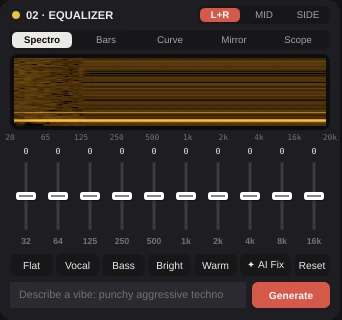
A ten band EQ over a live spectrogram, in stereo, mid or side, with quick curves for vocal, bass, bright and warm, or an AI fix from a few words.
- Stereo, mid or side
- Spectro, bars, curve, mirror, scope
- Quick curves and AI fix
Dynamics and tone
Glue, saturate, then shape.
Glue the mix, add saturation in five flavors, bring out the transients, then shape sub, low, mid, high and air on their own.
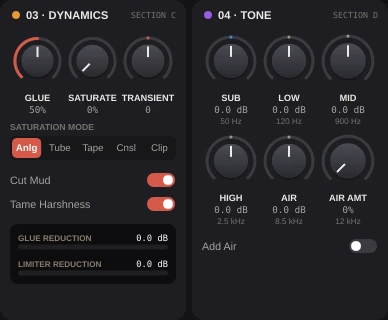
- Analog, tube, tape, console and clip
- Cut mud and tame harshness
- Five tone bands
Output
A ceiling that never clips.
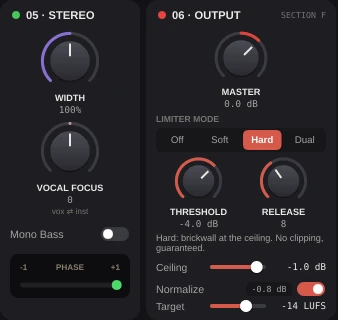
Width, vocal focus and mono bass, then a limiter in soft, hard or dual mode with a ceiling that holds.
- Width and vocal focus
- Mono bass
- Soft, hard or dual limiting
Mix check
Know what is off before you export.
Real time analysis checks loudness, peaks, width, low end, mids, highs, dynamics and mud, and says what to fix in plain words.
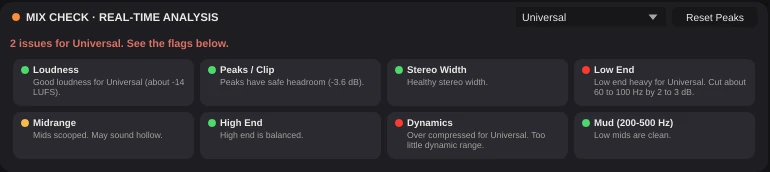
- Eight checks
- Plain words, not numbers
AURIUM Master
Made for
- Streaming masters
- Singles
- Beats
- EPs and albums
- Stems
- Live recordings
- Podcasts
What you need
Windows
- Operating system
- Windows 10 or 11, 64 bit
- Processor
- Intel or AMD, 64 bit
- Memory
- 8 GB, 16 GB for big projects
- Audio
- ASIO or Windows audio
- Plugins
- The Listn plugins, plus your VST3
macOS
- Operating system
- A recent macOS
- Processor
- Apple silicon or Intel
- Memory
- 8 GB, 16 GB for big projects
- Audio
- Core Audio
- Plugins
- The Listn plugins, plus your VST3 and AU
Comes with Listn Studio
Put it onyour track.
Download Listn Studio, open the mixer and it is in the insert list. Every module and every setting, nothing extra to unlock.
- 1
Download
Get Listn Studio for Windows or Mac and sign in.
- 2
Open the mixer
Press + in an insert slot and pick it under Listn effects.
- 3
Make it yours
Save your settings as a preset and learn its knobs on your controller.
Listn Studio
Full license, every plugin
- Every Listn plugin, the ones coming too
- Windows and Mac on your own computers
- Your VST3 and AU plugins beside them
- MIDI learn on every knob
- Updates to this version
Questions
Before you ask.
Where does it go?
On the master out. The mixer has a Mastering button on the master channel that opens it.
Will it clip?
No. The output limiter holds the ceiling you set.
Can I compare?
Yes. Store four snapshots, A to D, and switch between them with the gain matched.
Do I pay for the plugins?
No. Every Listn plugin comes with Listn Studio, and the ones still coming arrive as free updates to this version.
Do they work in other DAWs?
The Listn plugins run inside Listn Studio. Your own VST3 and AU plugins run beside them.
Can I control them from a MIDI controller?
Yes. Right click any knob and choose Learn, then move a control on your keyboard, pads or mixer.
How many computers?
Your license works on your own computers, Windows and Mac.
Where do I get help?
Write to us from the Contact page, or use Help, Report a bug or an idea in Listn Studio.