
Vocal · Pitch correction
Listn Tune
Natural. Tight. Tuned.
Real time pitch correction, from natural to hard tune.
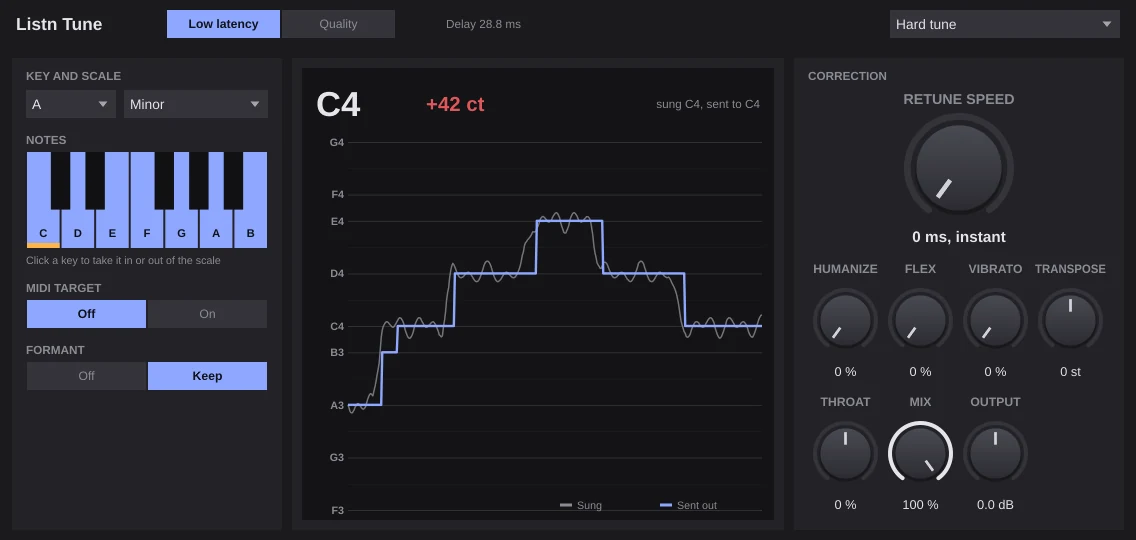
Set the key and scale, then the retune speed: instant for the hard tuned effect, slower for a natural vocal. Humanize lets long notes breathe, Flex only touches notes that are already close, and Formant keep moves the pitch without changing the voice. A held MIDI note can set the target.
- Key and scale, or pick the notes yourself
- Retune speed from instant to 400 ms
- Humanize, flex and natural vibrato
- Formant keep and throat
- Target notes from MIDI
The graph
See the voice land on the note.
The sung pitch and the pitch sent out scroll by against the notes of your scale, with the note and how many cents off it was.
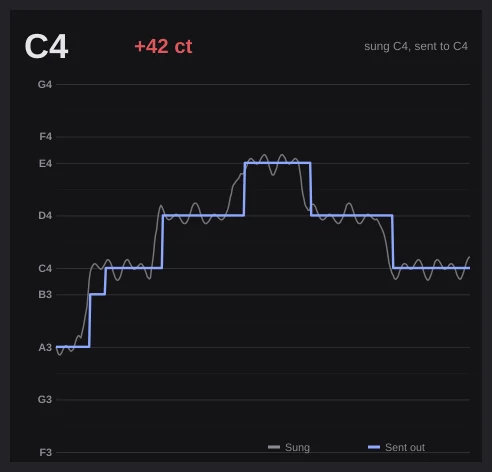
- Sung and sent out
- The note and the cents
The correction
Instant, or barely there.
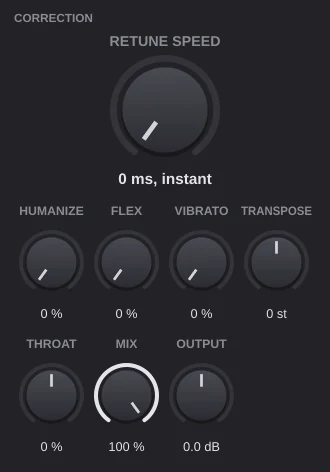
Retune speed sets how fast it pulls to the note. Humanize, Flex and Vibrato keep a natural take natural; Transpose and Throat change the voice on purpose.
- Retune speed
- Humanize, flex, vibrato
- Transpose, throat, mix
Listn Tune
Presets
- Natural
- Tight pop
- Hard tune
- Rap glide
- RnB runs
- Choir blend
- Robot
- Light touch
- Deep double
- Chipmunk
- Octave under
What you need
Windows
- Operating system
- Windows 10 or 11, 64 bit
- Processor
- Intel or AMD, 64 bit
- Memory
- 8 GB, 16 GB for big projects
- Audio
- ASIO or Windows audio
- Plugins
- The Listn plugins, plus your VST3
macOS
- Operating system
- A recent macOS
- Processor
- Apple silicon or Intel
- Memory
- 8 GB, 16 GB for big projects
- Audio
- Core Audio
- Plugins
- The Listn plugins, plus your VST3 and AU
Comes with Listn Studio
Put it onyour track.
Download Listn Studio, open the mixer and it is in the insert list. Every module and every setting, nothing extra to unlock.
- 1
Download
Get Listn Studio for Windows or Mac and sign in.
- 2
Open the mixer
Press + in an insert slot and pick it under Listn effects.
- 3
Make it yours
Save your settings as a preset and learn its knobs on your controller.
Listn Studio
Full license, every plugin
- Every Listn plugin, the ones coming too
- Windows and Mac on your own computers
- Your VST3 and AU plugins beside them
- MIDI learn on every knob
- Updates to this version
Vocal
Also in the bundle
Listn Pitch Pitch and timing editor Listn Vocal Producer Vocal chain Listn Clarity Vocal clarity and de-noiseQuestions
Before you ask.
Where do I find it?
Open the mixer, press + in an insert slot and pick Listn Tune under Listn effects.
Can I use it while recording?
Yes. Pick Low latency (about 29 ms); Quality adds a little more delay for the smoothest result.
Do I pay for the plugins?
No. Every Listn plugin comes with Listn Studio, and the ones still coming arrive as free updates to this version.
Do they work in other DAWs?
The Listn plugins run inside Listn Studio. Your own VST3 and AU plugins run beside them.
Can I control them from a MIDI controller?
Yes. Right click any knob and choose Learn, then move a control on your keyboard, pads or mixer.
How many computers?
Your license works on your own computers, Windows and Mac.
Where do I get help?
Write to us from the Contact page, or use Help, Report a bug or an idea in Listn Studio.