
Vocal · Vocal chain
Listn Vocal Producer
Clean. Tight. Finished.
The vocal sound in one window: clean, tone, tighten, de-ess, air, width and space.
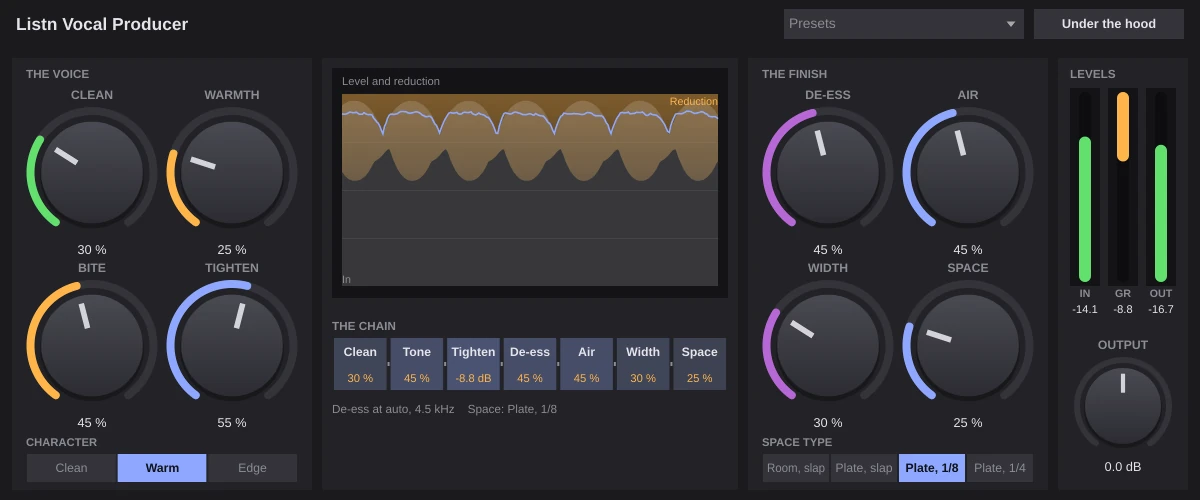
A whole vocal chain behind a few big knobs, in a good order: Clean, Warmth and Bite, Tighten, De-ess, Air, Width and Space. Pick a character, pick a space, or start from a preset for pop, rap, RnB, rock, ballads, backgrounds, ad-libs or a podcast voice. Under the hood has the fine controls when you want them.
- Twelve presets to start from
- A de-esser that finds the voice's s by itself
- Tighten levels, then catches the peaks
- Space: a slap or a plate, in time with the song
The chain
Every stage, in view.
The display shows the level and how much the chain is holding it, and the chain strip lights each stage with what it is doing right now, down to the frequency the de-esser picked.
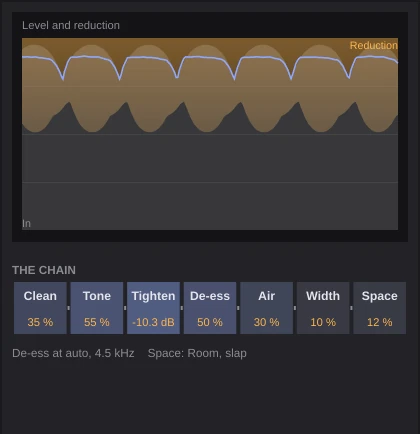
- Level and reduction
- Each stage with its amount
- IN, GR and OUT meters
Under the hood
The fine controls, when you want them.
Low cut, gate depth, the de-ess frequency, the leveler speed, the air frequency, the space decay, the echo feedback and tone, and the mix. Hidden until you ask for them.
- Nine fine controls
- Shown or hidden, kept with the song

Listn Vocal Producer
Presets
- Pop lead
- Rap lead
- RnB smooth
- Rock lead
- Ballad
- Backgrounds
- Ad-libs
- Podcast voice
- Bright and close
- Dark and intimate
- Gospel lead
- Live and raw
What you need
Windows
- Operating system
- Windows 10 or 11, 64 bit
- Processor
- Intel or AMD, 64 bit
- Memory
- 8 GB, 16 GB for big projects
- Audio
- ASIO or Windows audio
- Plugins
- The Listn plugins, plus your VST3
macOS
- Operating system
- A recent macOS
- Processor
- Apple silicon or Intel
- Memory
- 8 GB, 16 GB for big projects
- Audio
- Core Audio
- Plugins
- The Listn plugins, plus your VST3 and AU
Comes with Listn Studio
Put it onyour track.
Download Listn Studio, open the mixer and it is in the insert list. Every module and every setting, nothing extra to unlock.
- 1
Download
Get Listn Studio for Windows or Mac and sign in.
- 2
Open the mixer
Press + in an insert slot and pick it under Listn effects.
- 3
Make it yours
Save your settings as a preset and learn its knobs on your controller.
Listn Studio
Full license, every plugin
- Every Listn plugin, the ones coming too
- Windows and Mac on your own computers
- Your VST3 and AU plugins beside them
- MIDI learn on every knob
- Updates to this version
Vocal
Also in the bundle
Listn Pitch Pitch and timing editor Listn Clarity Vocal clarity and de-noise Listn Tune Pitch correctionQuestions
Before you ask.
Where do I find it?
Open the mixer, press + in an insert slot and pick Vocal Producer under Listn effects.
Do I still need other plugins on the vocal?
Usually not. It has the cleanup, tone, compression, de-ess, air, width and space in one.
Do I pay for the plugins?
No. Every Listn plugin comes with Listn Studio, and the ones still coming arrive as free updates to this version.
Do they work in other DAWs?
The Listn plugins run inside Listn Studio. Your own VST3 and AU plugins run beside them.
Can I control them from a MIDI controller?
Yes. Right click any knob and choose Learn, then move a control on your keyboard, pads or mixer.
How many computers?
Your license works on your own computers, Windows and Mac.
Where do I get help?
Write to us from the Contact page, or use Help, Report a bug or an idea in Listn Studio.